Access Control Module
Steps to Unlock Doors Using Access Control
- Ensure that Bluetooth is turned on on your device.
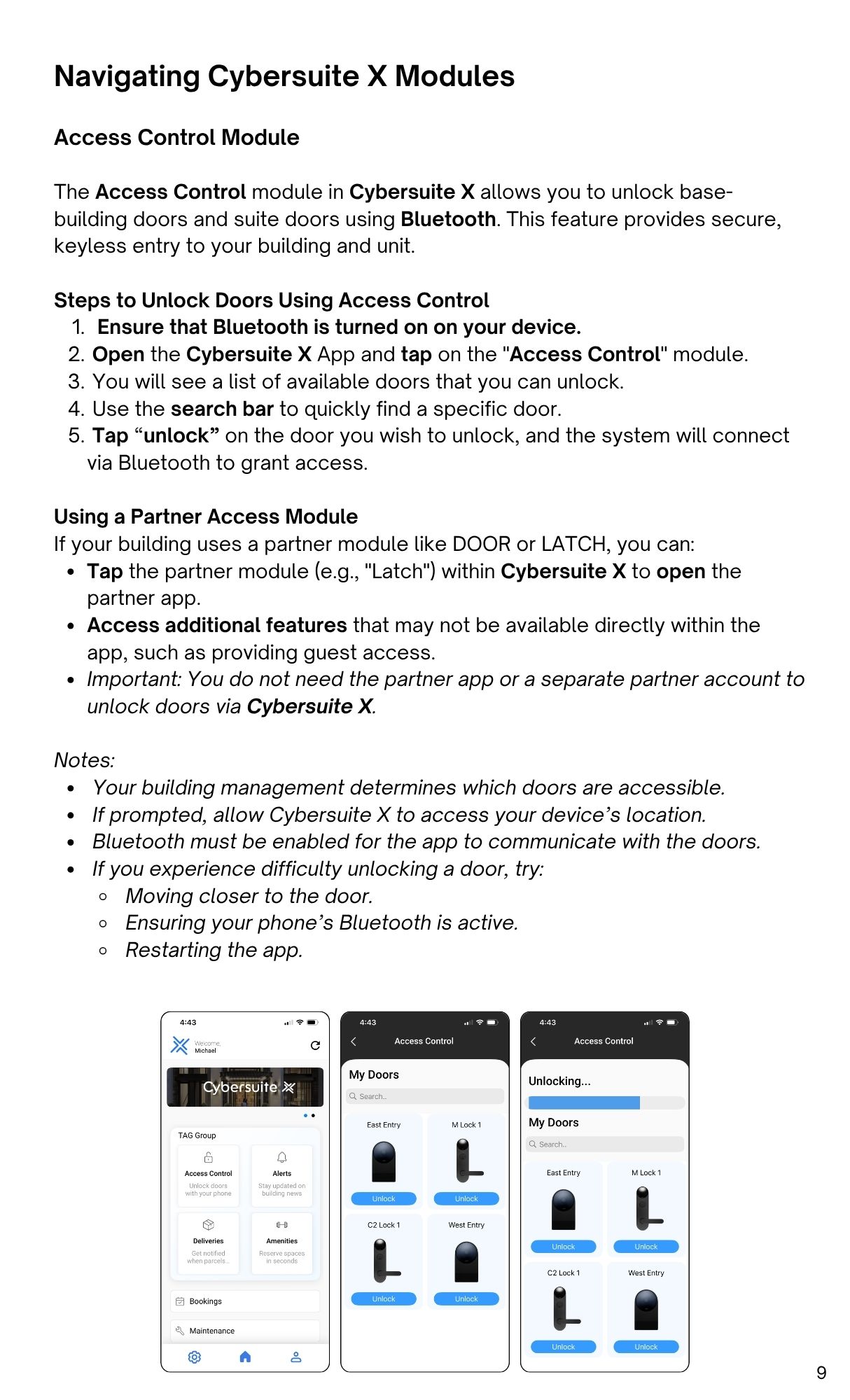
- Open the Cybersuite X App and tap on the "Access Control" module.
- You will see a list of available doors that you can unlock.
- Use the search bar to quickly find a specific door.
- Tap “unlock” on the door you wish to unlock, and the system will connect
via Bluetooth to grant access.
Using a Partner Access Module
If your building uses a partner module like DOOR or LATCH, you can:
- Tap the partner module (e.g., "Latch") within Cybersuite X to open the
partner app. - Access additional features that may not be available directly within the
app, such as providing guest access. - Important: You do not need the partner app or a separate partner account to
unlock doors via Cybersuite X.
Notes:
- Your building management determines which doors are accessible.
- If prompted, allow Cybersuite X to access your device’s location.
- Bluetooth must be enabled for the app to communicate with the doors.
- If you experience difficulty unlocking a door, try:
- Moving closer to the door.
- Ensuring your phone’s Bluetooth is active.
- Restarting the app.