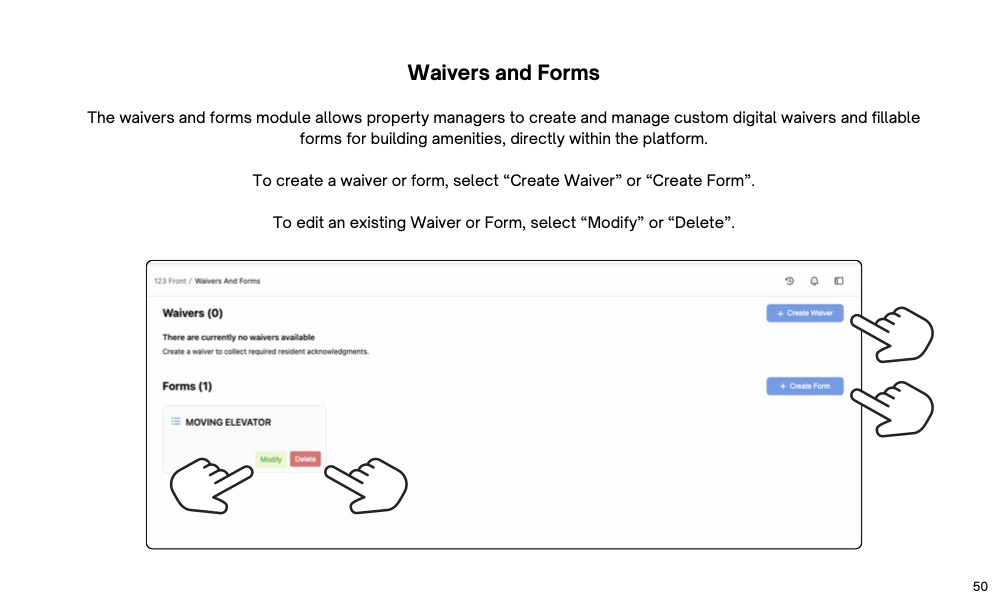
Select Waivers and Forms.
To create a waiver, select Create Waiver.
Here, you can set a name, upload a PDF of the waiver, and enable occupant acknowledgment if required.
Once complete, select create waiver.
To create a form, select create form.
Here, you can set a name, and add relevant questions.
To add a question, enter the text in the text box, and select text field if you want the resident to answer via text, or select date picker if you want the resident to select a date. Enable required if the question needs to be answered for the resident to proceed.
After adding the necessary questions, enable occupant acknowledgment, if required.
Once complete, select create form.
To change an existing waiver or form, select modify to change the details of the waiver or form, and select delete to remove the form.
To add a waiver or form to a specific amenity, select add waiver or add form, and select from the dropdown menu.

Streamline operations, boost productivity, and drive innovation with our all-in-one platform.