Deliveries Module
Steps to View and Manage Deliveries
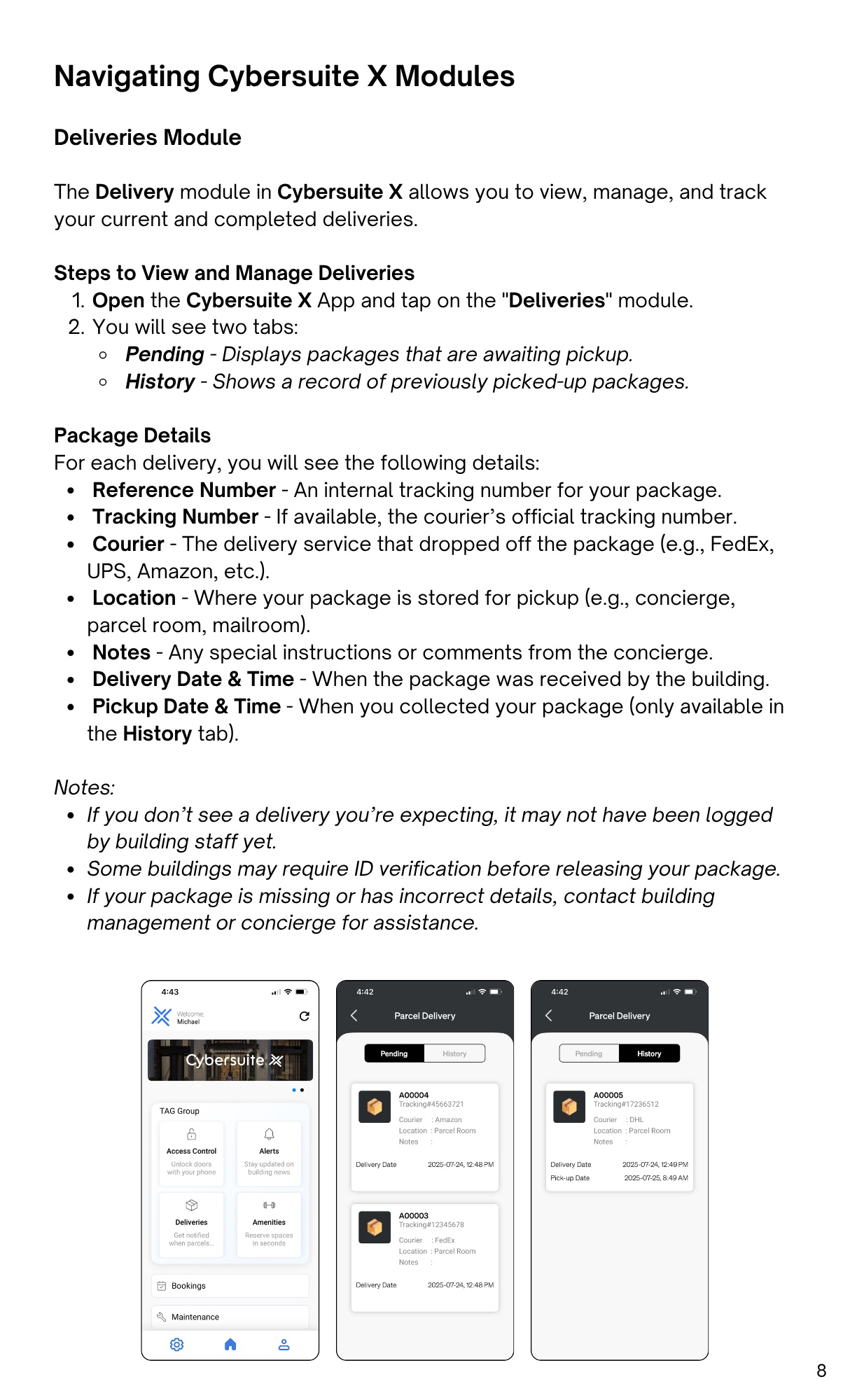
- Open the Cybersuite X App and tap on the "Deliveries" module.
- You will see two tabs:
- Pending - Displays packages that are awaiting pickup.
- History - Shows a record of previously picked-up packages.
Package Details
For each delivery, you will see the following details:
- Reference Number - An internal tracking number for your package.
- Tracking Number - If available, the courier’s official tracking number.
- Courier - The delivery service that dropped off the package (e.g., FedEx,
UPS, Amazon, etc.). - Location - Where your package is stored for pickup (e.g., concierge,
parcel room, mailroom). - Notes - Any special instructions or comments from the concierge.
- Delivery Date & Time - When the package was received by the building.
- Pickup Date & Time - When you collected your package (only available in
the History tab).
Notes:
- If you don’t see a delivery you’re expecting, it may not have been logged
by building staff yet. - Some buildings may require ID verification before releasing your package.
- If your package is missing or has incorrect details, contact building
management or concierge for assistance.