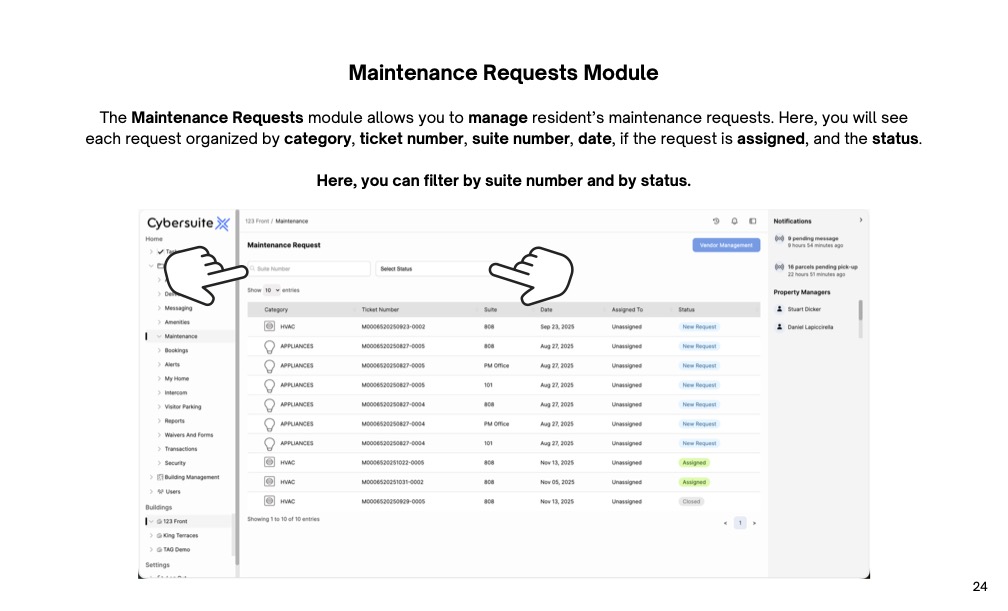
The Maintenance Requests module allows you to manage resident’s maintenance requests. Here, you will see each request organized by category, ticket number, suite number, date, if the request is assigned, and the status.
The Maintenance Requests module also allows you to manage your vendors.
Select Vendor Management to begin.
Here, you will see a list of your vendors. To update an existing vendor, select one from the list.
To add a new vendor to your building, select Add Vendor.
Here, you will add the vendor's company name, category, active status, contact name, phone number, email address, and company address. You can also add a photo of the company logo, and vendor notes.
Once done, select save.
To view a Maintenance Request, select one from the list available.
You will see a preview of the request, from here you can either view details or assign the request.
On the Maintenance Details page, you can view, edit and manage the request. You will see details like the ticket number, suite number, resident’s name, entry notes and details. You can edit the category, status, assigned status and vendor. Here, you can also request a quote from a vendor and send messages to the resident.

Streamline operations, boost productivity, and drive innovation with our all-in-one platform.