Messages Module

The Messages module in Cybersuite X allows you to communicate directly
with Property Management for quick assistance, inquiries, and updates.

Direct Messaging

Steps to Send and Manage Messages

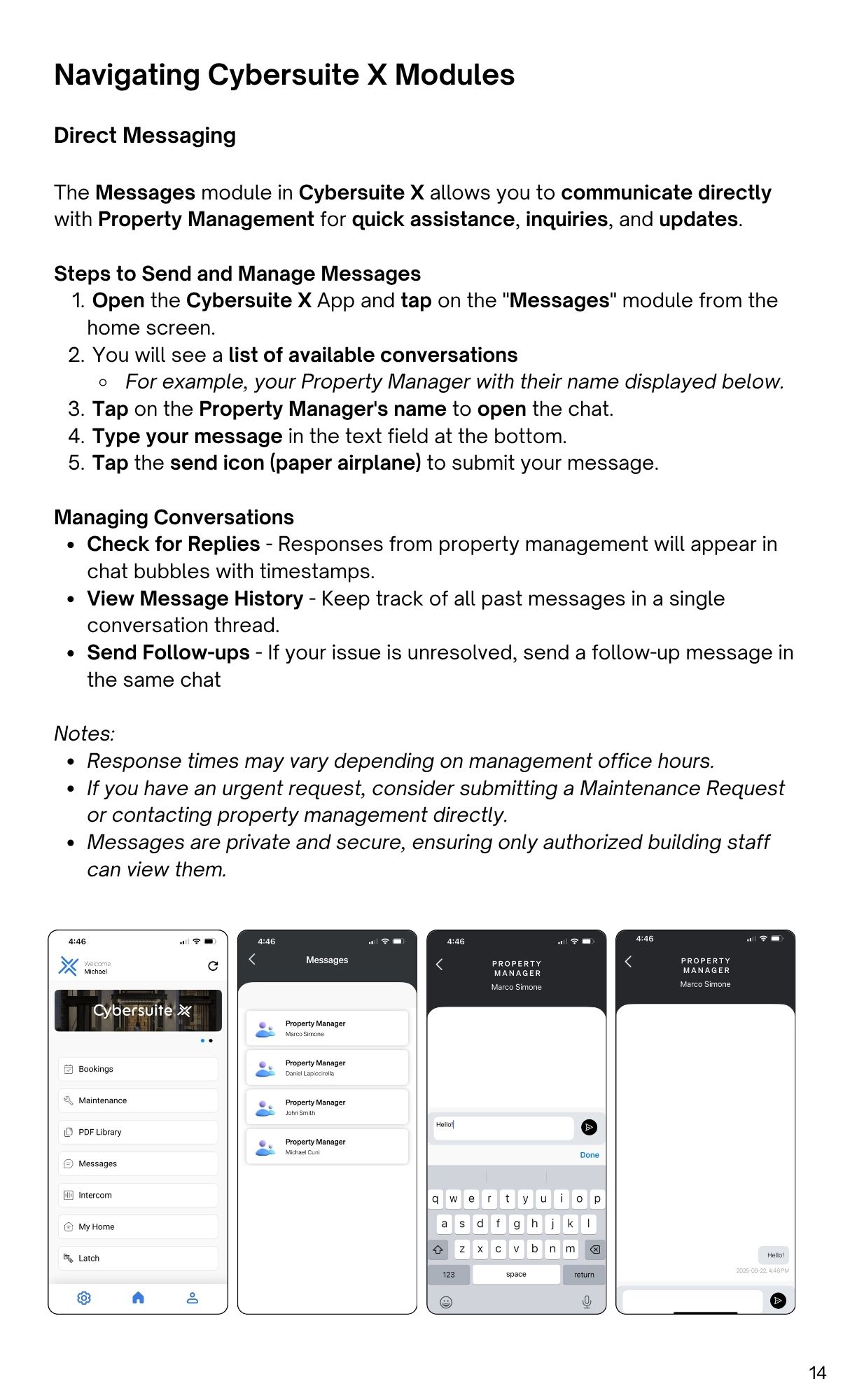
  1. Open the Cybersuite X App and tap on the "Messages" module from the
    home screen.
  2. You will see a list of available conversations
    • For example, your Property Manager with their name displayed below.
  3. Tap on the Property Manager's name to open the chat.
  4. Type your message in the text field at the bottom.
  5. Tap the send icon (paper airplane) to submit your message.

Managing Conversations

  • Check for Replies - Responses from property management will appear in
    chat bubbles with timestamps.
  • View Message History - Keep track of all past messages in a single
    conversation thread.
  • Send Follow-ups - If your issue is unresolved, send a follow-up message in
    the same chat

Notes:

  • Response times may vary depending on management office hours.
  • If you have an urgent request, consider submitting a Maintenance Request
    or contacting property management directly.
  • Messages are private and secure, ensuring only authorized building staff
    can view them.