My Home Module

The My Home module in Cybersuite X allows you to manage your smart
thermostat
directly from the app, giving you control over your unit's
temperature
settings for comfort and energy efficiency.

My Home Module

Steps to Access and Adjust Your Thermostat

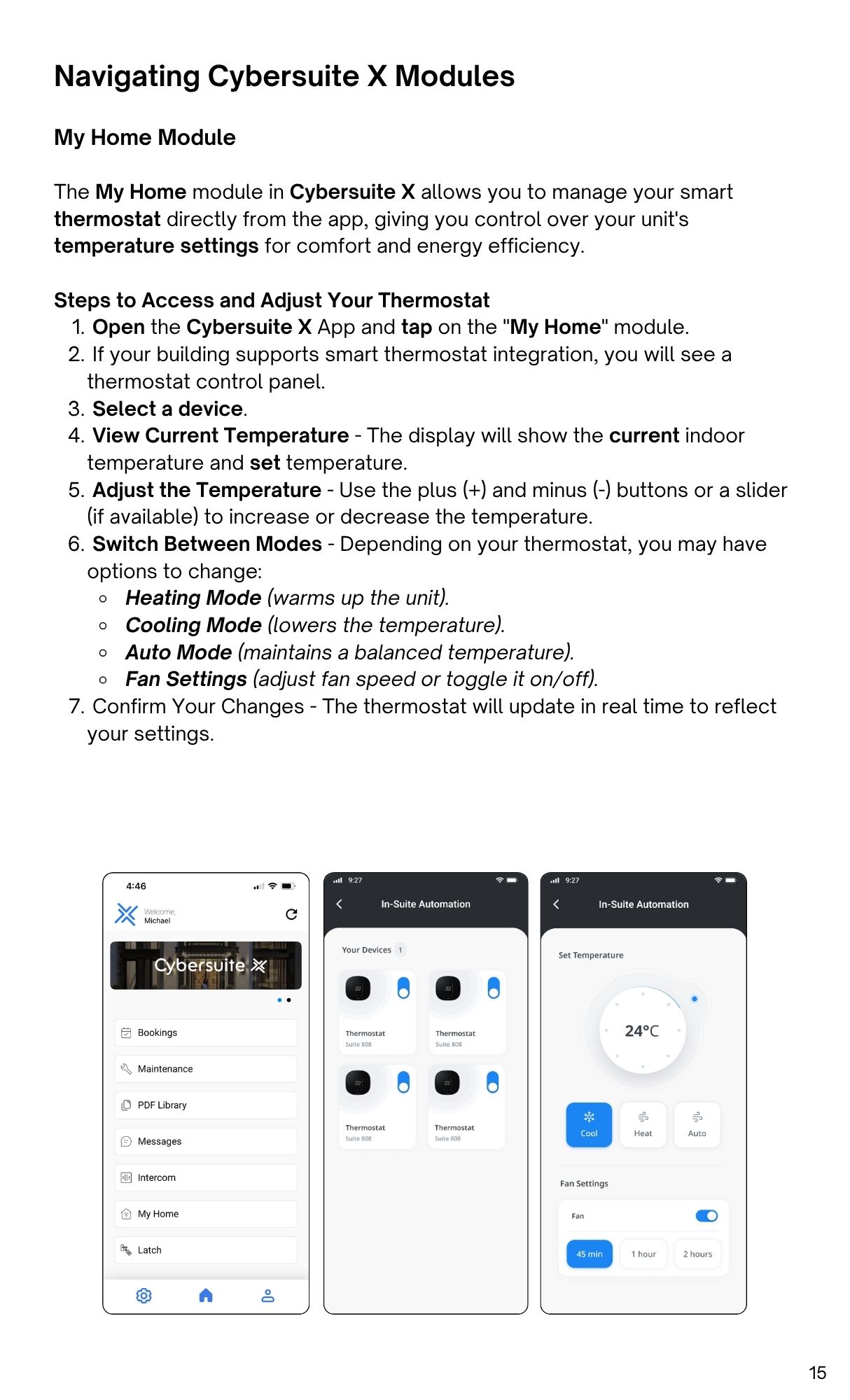
  1. Open the Cybersuite X App and tap on the "My Home" module.
  2. If your building supports smart thermostat integration, you will see a
    thermostat control panel.
  3. Select a device.
  4. View Current Temperature - The display will show the current indoor
    temperature and set temperature.
  5. Adjust the Temperature - Use the plus (+) and minus (-) buttons or a slider
    (if available) to increase or decrease the temperature.
  6. Switch Between Modes - Depending on your thermostat, you may haveoptions to change:
    • Heating Mode (warms up the unit).
    • Cooling Mode (lowers the temperature).
    • Auto Mode (maintains a balanced temperature).
    • Fan Settings (adjust fan speed or toggle it on/off).
  7. Confirm Your Changes - The thermostat will update in real time to reflectyour settings.